Help us identify the most valuable MCP Server use cases in Digital.ai Deploy

We are exploring MCP Server use cases for Digital.ai Deploy and want to understand where it could bring the most value to your deployment workflows.

If you use Deploy and have ideas, challenges, or repetitive tasks where AI-assisted workflows could help, we’d love to hear from you.

💬 Leave a comment here, and we’ll reach out to schedule a short discovery session.

G

When deployment packages get big: how Deploy improves large artifact handling

In enterprise environments, deployment packages can naturally grow over time.
Teams may work with large application archives, generated bundles, folder-based packages, or artifacts with many nested files.

With Digital.ai Deploy 26.1, large artifact handling has been improved.
Deploy can now handle artifacts of 2 GB or larger more efficiently by using a streaming approach instead of loading the full artifact into memory.

Why does this matter?

Because deployment reliability is not only about the deployment logic itself. Sometimes, a deployment can be correctly configured but still run into problems because the package is large and difficult to process efficiently.

This improvement helps reduce memory pressure and makes large artifact deployments more resilient, especially for teams working with bigger packages or running multiple deployments in parallel.

This may be especially relevant if your teams deploy:

large application archives
folder-based deployment packages
generated enterprise bundles
packages with many nested files
multiple large artifacts in parallel

  • How do you currently manage large deployment artifacts?

  • Do you split packages, tune memory settings, use external storage, or rely on the deployment platform to handle large artifacts automatically?

For technical details, check the Deploy 26.1 documentation.

G

Ask Release is here: AI-powered support for smarter release management

We’re excited to introduce Ask Release, now available for trial users and SaaS customers.

Ask Release brings AI assistance directly into Release, helping teams get faster answers, understand release status more easily, identify potential issues, and reduce the manual effort involved in managing complex release processes.

Instead of spending time searching through releases, tasks, and status details, teams can simply ask questions and get useful insights in context. The goal is simple: help release teams move faster, make better decisions, and focus more on delivery.

If you are using the trial version or Release SaaS, you can try Ask Release today. Support for on-premises users is coming soon.

Learn more in the blog post:
https://digital.ai/catalyst-blog/ask-release-leverage-ai-to-streamline-devops/

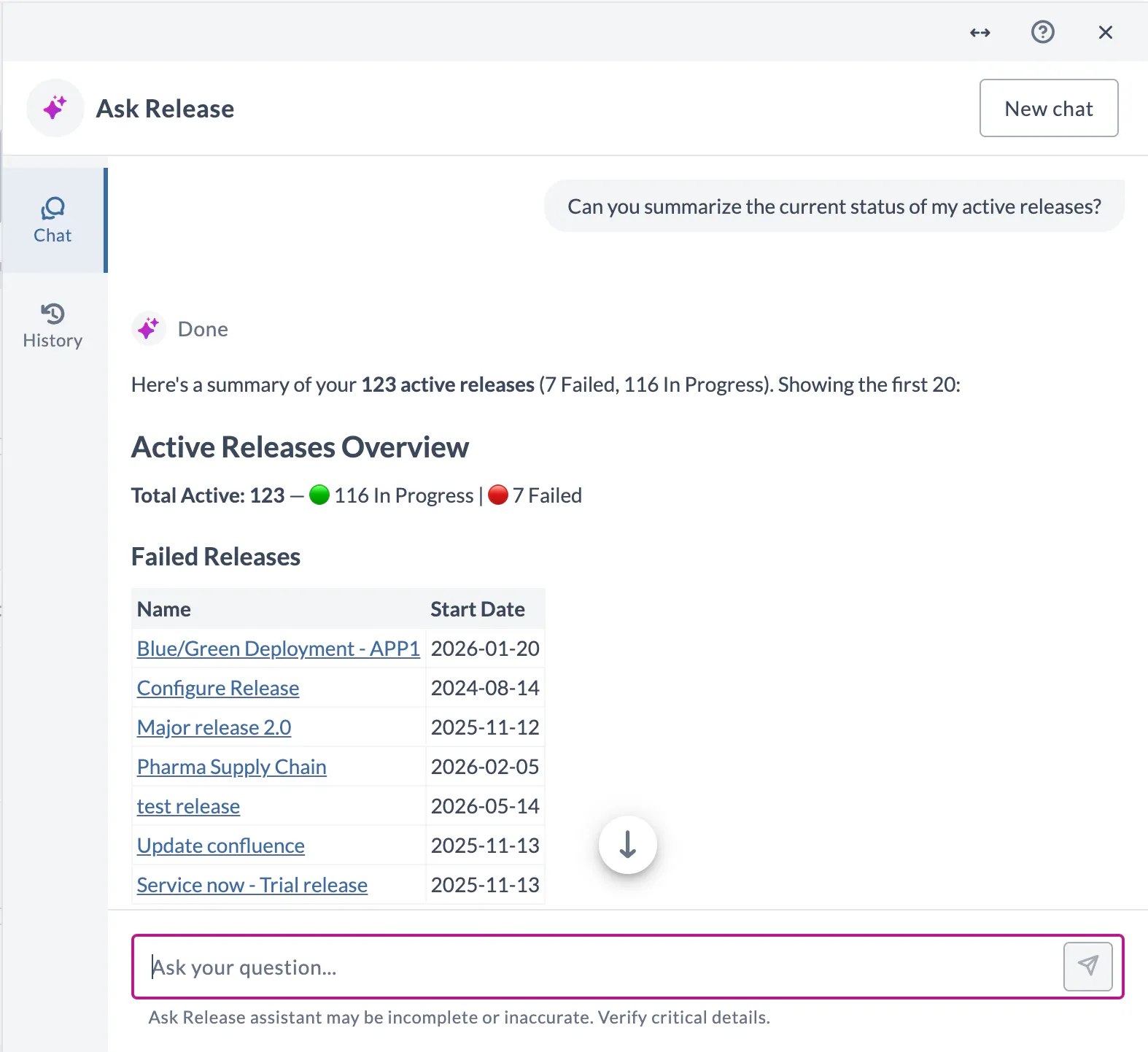
Ask Release in Digital.ai Release showing an AI-generated summary of active release status.

G

Introducing Release SaaS Platform (Enterprise Release Orchestration as SaaS)

We’re excited to share early details on Release SaaS Platform, Digital.ai’s enterprise SaaS offering for orchestrating and automating software releases—built for organizations that need SaaS functionality without giving up the governance, visibility, and accountability required in complex and regulated environments.  

Why this matters now - Many enterprises are shifting toward SaaS and hybrid models, but release operations are often where that transition stalls due to security and compliance expectations, data residency considerations, and the need for secure execution patterns. Release SaaS Platform is designed to help teams move forward confidently.  

What it is - A centralized SaaS control plane for release orchestration, including pipeline orchestration plus a release UI and dashboards. The goal is to provide a consistent orchestration and governance layer over existing toolchains, so teams don’t have to rip and replace their CI systems.  

What to expect (GA direction) 

  • Full orchestration at enterprise scale with RBAC, auditability, and governance controls 

  • Packaged integrations for common CI/CD, ITSM, and DevSecOps tools 

  • Scaled SaaS infrastructure designed for reliability and operational simplicity 

Hybrid & multi-cloud support 

Release SaaS Platform supports hybrid and multi-cloud delivery by providing a central SaaS control plane that orchestrates releases across distributed targets—so teams can apply consistent governance and repeatable workflows across clouds, regions, and operating models. 

HA and DR are core to the platform’s operations to prevent orchestration downtime from slowing delivery. Release SaaS Platform is built to run reliably in resilient configurations and maintain continuity across HA/DR setups. 

Execution model (Phase 1 → Phase 2) 

Phase 1: Hosted runners (initial GA execution model) 
Hosted runners provide the fastest path to value—Digital.ai manages runner infrastructure, scaling, and reliability so teams can start orchestrating releases quickly with minimal operational overhead. 

Phase 2: On-prem runners (roadmap) 
For organizations that require execution inside restricted networks (e.g., regulated environments, data residency boundaries, isolated production systems), on-prem runners are planned in the next phase—extending the platform into a hybrid execution model while maintaining the same SaaS control plane and governance. 

2
G

Set your default landing pages in Release 26.1 🏠

Release 26.1 lets each user configure which page opens by default after logging in or opening a folder. Go to Personal Settings → Profile to set:

  • Default global page - the first page shown after login. Choose from Home, Folders, Tasks, Releases, or Templates.

  • Default folder page - the page shown when opening a folder. Choose between Releases or Templates.

If you mostly review tasks (setting global landing page to Tasks) or design templates (setting folder landing page to Templates), these settings will save you clicks every session.

👉 Learn more in the docs

2

A much needed improvement.

G

Easier connection management in Release 26.1 🔌

The Connections page (at Global and Folder levels) got some useful upgrades:

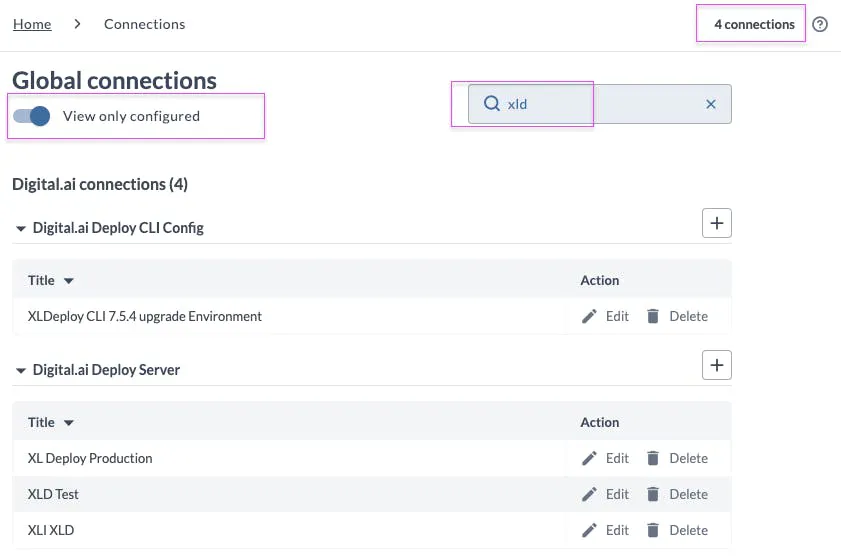
  • Toggle View only configured to hide unconfigured connections and focus on what's actually in use.

  • See the total number of connections and a count per connection type at a glance.

  • Use the search bar to filter by connection type or name.

  • Each connection now has a direct link you can copy and share with your team.

👉 Learn more in the docs

1
G

🚀 Release 26.1 is Here — Introducing Git Version Diff Support

Keeping track of changes between Git versions just got a whole lot easier.

With Release 26.1, we’re excited to introduce Git Versioning Comparison Support — a powerful new feature that helps teams quickly compare versions, review changes, and identify updates directly from the Release UI.


🔍 What’s New?

Compare Git Versions Instantly

Users can now compare:

- Two Git versions side-by-side

- A Git version against the current state of a folder

This makes it faster than ever to understand what changed between versions without leaving the application.


✨ Key Highlights

📁 Enhanced File Explorer Comparison

The new comparison experience clearly highlights:

- Added files

- Removed files

- Modified files

This allows users to quickly identify impacted files and focus on what matters most.

🧩 Line-by-Line File Diff Viewer

Selecting a modified file opens a detailed comparison dialog showing differences between the two file.

Developers and release managers can now review changes with precision directly within the Release UI.


💡 Why It Matters

Git version comparison is critical for:

- Faster version validation

- Easier troubleshooting

- Improved collaboration between teams

- Better confidence before deployment

Release 26.1 streamlines the review process and reduces the need to switch between external tools.

📘 Want to learn more?

Check out the Release 26.1 release notes and detailed Version Comparison documentation here:
https://docs.digital.ai/release/docs/release-notes/release-notes-release#version-comparison

2
G

Agentic Tasks Are Here!

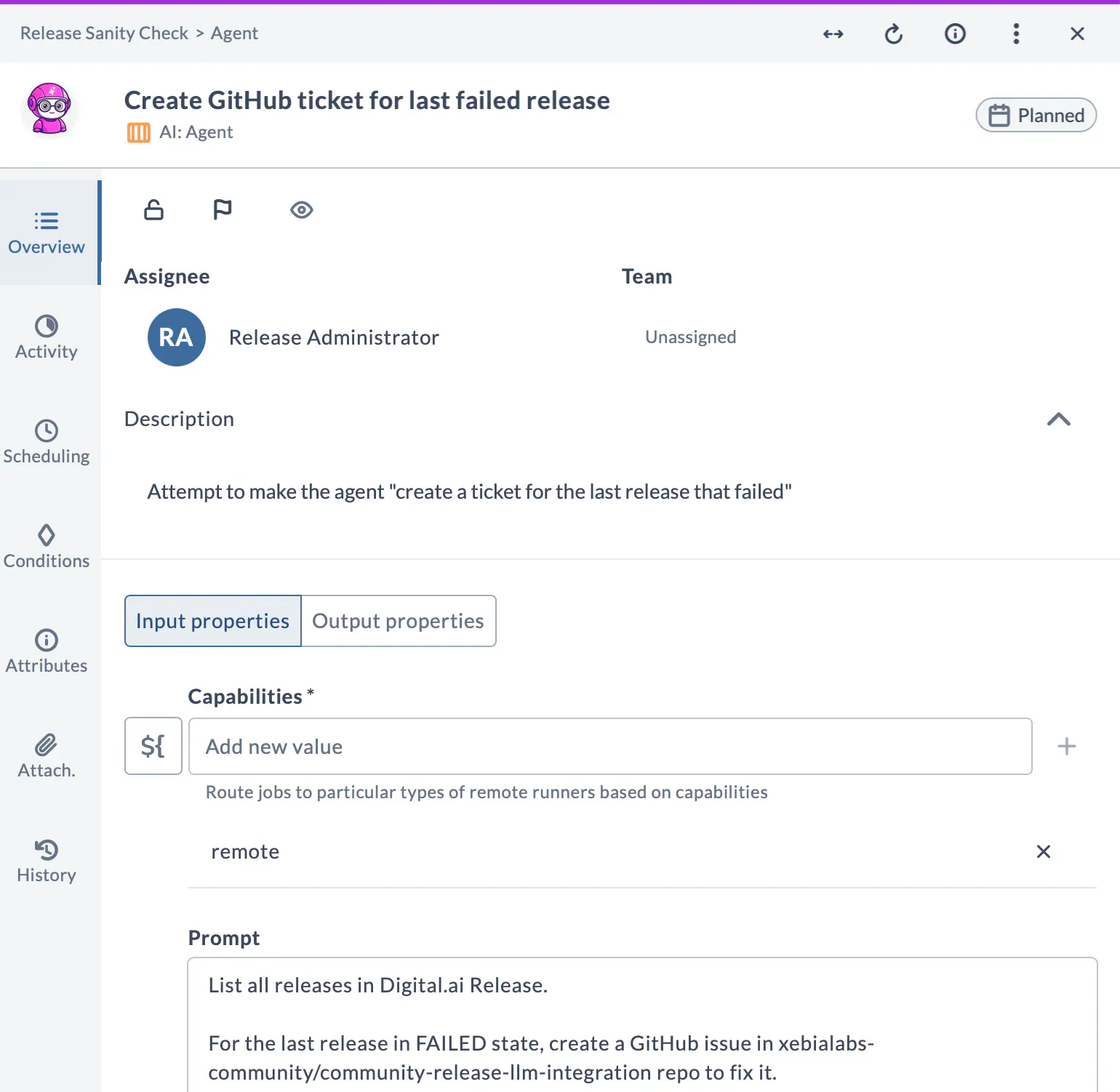
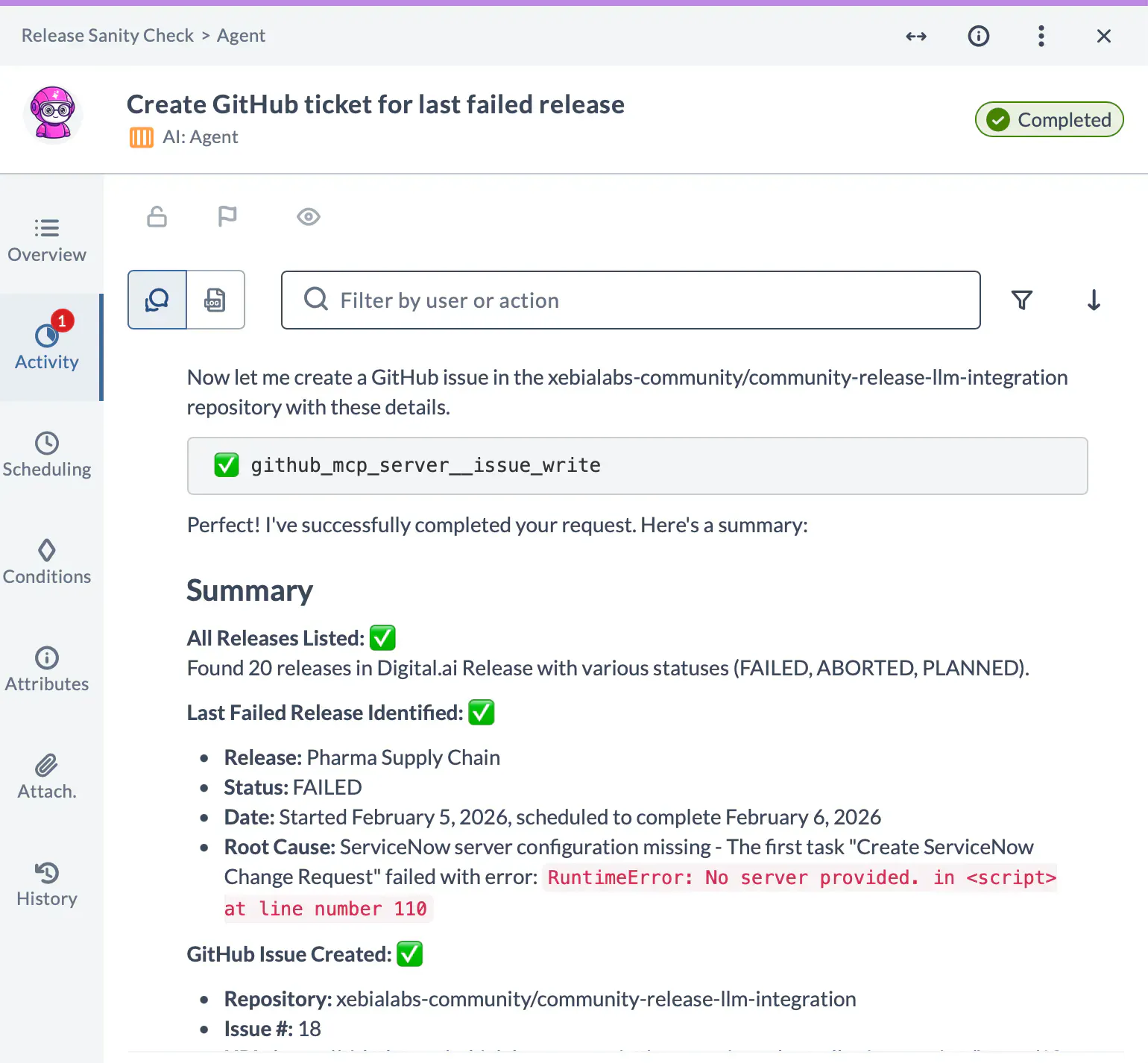
“Create A GitHub issue for the last failed release”

What if you didn’t need to write a Jython script or develop a plugin to make this work?

Well, with our new AI-powered Agent task, you don't have to!

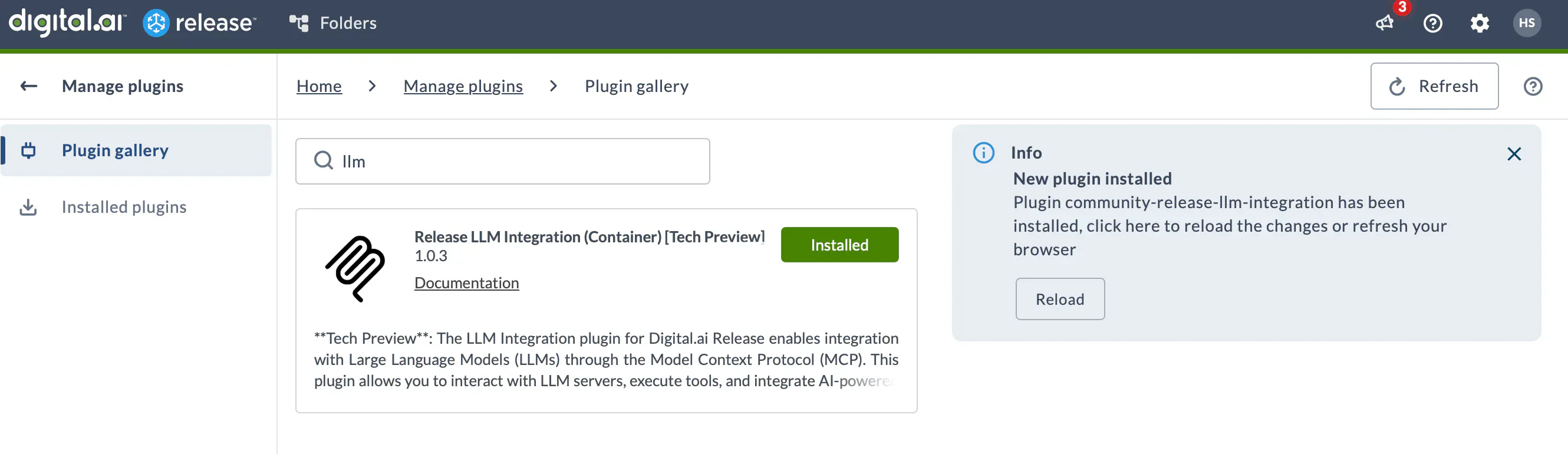
With the new Agent task, you can connect to multiple MCP servers, use your favorite LLM and have an agent take care of things, right there in the release process.

Simply configure your MCPs and LLMs as Connections and configure them in the task. Give it a prompt, and the task will figure out what to do.

This is part of our new LLM Integration plugin, now in Tech Preview. Compatible with Release 25.3 and higher.

Download it from the Manage Plugins page — no restart required! 

There are more tasks in the bundle: 

  • An MCP tool task for quick integrations. No LLM required! So no token spend

  • A Prompt task to interact directly with LLMs

Embed AI directly into your release orchestration process. For example, let agents handle the tedious cross-tool grunt work (creating tickets, gathering failure info, notifying teams) while your existing pipeline keeps everything visible and under control.

Try it out it and let us know what you have used it for!

Have fun 🤩

-- The Release Team

Links
- Release notes
- Documentation
- Marketplace


4
G

REST API doc

Greetings.

Is there another REST API doc besides: https://apidocs.digital.ai/xl-release/25.3.x/rest-docs/ ?

I was hoping to get more granular options such as we have on XLD's REST API. 

Things I am missing on XLR:

  1. List the available types

  2. CRUD operation on tasks

  3. Service shutdown

  4. Get server info

  5. Run garbage collector

Thanks in advance.

Kiran Sureshraaj
Peter Gibbons

Hi Lourenço Costa,

Thanks for your post and for outlining the additional REST API capabilities you’re looking for.

To help us better understand your request, could you provide a bit more detail on the specific functionality or use cases you’re trying to achieve with these endpoints?

We’d like to better understand your requirements and determine whether the functionality may already be achievable through existing platform features.

Thanks,
Peter

G

Digital.ai Release and Deploy 26.1 are now available!

Dear users, we are happy to announce that our latest major versions of Release and Deploy are available!

Key features of Release 26.1 include:

Release LLM integration container plugin (Beta) – brings AI-powered automation to Release. Connect to LLM providers, call tools on MCP servers, and build autonomous AI agents that combine reasoning and tool execution – all from within Release workflows. 5 task types are available with samples:

  • Querying MCP server tools and schemas

  • Executing MCP tools directly

  • Sending LLM prompts

  • Starting live conversational LLM sessions within task

  • Running autonomous AI agents that plan and execute multi-step workflows

Git folder versioning improvements – compare saved versions side by side or against the current folder state, with standard Git-style diff highlighting. New quick actions let you copy commit hashes and compare directly from the version list. Git-versioned folders now display a Git icon with the applied version number for easy identification.

Filtering improvements – a more consistent filtering experience across Tasks, Templates, Workflow Templates, and Workflow Executions pages. New Unassigned filter, which shows tasks with no user or team assigned on the Tasks page, and tag-based filtering with all/any modes for Templates, Workflow Templates and Executions.

UI & functional enhancements

  • Default landing pages – configure which page appears after login or when opening a folder in Personal settings

  • Connections page – allows to preview configured connections, with improved search by connection title and type

  • Passwords in tasks – new global setting to control visibility of the "Allow passwords in all fields" option

  • Release cards color update – finished releases now display task-type colors (faded) instead of uniform gray

Account lockout – configuration option to automatically locks internal user accounts after a configurable number of failed login attempts. Admins can manage locked accounts from the Users page, and a new API endpoint allows programmatic unlocking.

Permission updates

  • Runner permissions refined into three levels: View, Edit, and Registration

  • Admin permission now visible only to admin users

  • Plugin Manager access is view-only for users with Edit security permission

  • Task access page restricted to Admin users only

Release Runner enhancements – new configuration parameters for skipping TLS verification on legacy Kubernetes clusters and applying custom labels to execution pods. Runner metadata (cluster, environment, data center, namespace) now supports better organization. Runners page supports filtering by connection status, state, type, cluster, namespace, and environment.

 ⚠️ Breaking changes & End-of-life announcements

  • Folder naming restrictions – folders with invalid characters (< > : " / \ | ? *) cannot be versioned with Git versioning; rename affected folders after upgrade

  • Installation answer keys renamed: PostgresqlInstall → PostgresqlType

  • Experimental external operator upgrades may not work seamlessly; review documentation before upgrading

  • Apache Derby DB deprecated – will be removed in 26.3; migrate to H2 (test) or a supported external database (production)

Updated plugins include: Ansible Automation Controller, Argo CD, Bamboo, Bitbucket, Confluence, Dynatrace, Fortify SSC, GitLab, Python SDK, Release LLM Integration, Remote Completion, ServiceNow, Sonatype Nexus IQ, Spinnaker, and Tekton. 

Digital.ai Release

Release notes | Download here (requires login)

Key features of Deploy 26.1 include:

GitOps in Deploy – bidirectional exchange of infrastructure and environment CIs with a Git repository using YAML files. Supports GitHub, GitLab, Azure DevOps, and Bitbucket. Export CIs from Deploy to Git for versioning and review, or import CIs from Git to create or update them.

Large artifact deployment – Deploy now supports deploying artifacts 2 GB or larger using a streaming approach instead of loading them entirely into memory. All artifact base types are supported. Configurable in-memory threshold and adaptive permissions for oversized archives.

Updated plugins include: Atlassian Bamboo, AWS, Azure, Command, GitOps, OSB, and WAS.

 ⚠️ Breaking changes & End-of-life announcements

  • RabbitMQ Topology Operator removed – review your configuration before upgrading

  • Installation answer keys renamed: PostgresqlInstall → PostgresqlType, RabbitmqInstall → RabbitmqType

  • Experimental external operator upgrades may not work seamlessly; review documentation before upgrading

  • Apache Derby DB deprecated – will be removed in 26.3; migrate to H2 (test) or a supported external database (production)

Digital.ai Deploy

Release notes | Download here (requires login)

The Digital.ai Release and Deploy Teams

1
G
Hes Siemelink

Release date for both Digital.ai Deploy 26.1 and Digital.ai Release 26.1 are planned for April 14, 2026

G

Help us improve reporting in Digital.ai Release

We want to understand how you use Release data and the reporting solutions your team relies on.

If reporting is important to your organization, we’d love to hear from you. Join a short discovery session with our product team to share your use cases, challenges, and needs.

💬 Leave a comment here, and we’ll reach out to schedule a session.

1

Hi!
we are using dai release and miss reports like
- "top 5 tasks that failed the most" and
- "how often was a (defined) task skipped"
are there any reports or scripts we could use?

G

How to enable Ask Release in Release 25.3

How to enable Ask Release in Release 25.3 ?

Yogev Baron

Hey Vasanth,

Thank you for asking. AskRelease is currently not available as part of version 25.3. However, if you're interested in trying it out, I’d be happy to arrange a call where you can explore the feature and share your feedback.

Best,

Yogev Baron, Product Manager

G

Remote Completions Task in Release

Hello,

We would like to use Remote Completion Task in our Release but the company doesn't allow IMAP (legacy) anymore and is not willing to enable it again. Is there another way to set this Remote Completion Task (f.e via Exchange Web Services (EWS)) or any other suggestions?

Kind regards,

H.A. Tiehuis

Anil Anaberumutt

We completely understand that your organization has moved away from IMAP and doesn’t plan to enable it again. The good news is that we’re introducing Microsoft Graph API support as an alternative for the IMAP - Remote Completion Task in our upcoming 26.1 release.

Once it’s available, we’d love for you to give it a try and let us know how it works for you.

Thanks

Anil A

G

Securing AI-Generated Code with Digital.ai Release

Introduction: AI Code Security and Its Emerging Risks

Large Language Models (LLMs) and AI-assisted coding tools offer immense potential in accelerating development cycles, reducing costs, and improving productivity. However, this acceleration comes at a cost: AI-generated code introduces significant security risks, many of which remain poorly understood, inadequately mitigated, and largely unregulated. The vulnerabilities inherent in AI-generated code are difficult to identify and remediate with limited frameworks and methodologies designed to evaluate, secure, and govern AI-driven software development.

Artificial intelligence (AI) code generation models are susceptible to producing insecure code; however, studies indicate that users perceive AI-generated code as being more trustworthy than human-generated code and there are limited frameworks detailing how to identify and address issues in AI-generated code. This causes organizations to have a significant blind spot where they incur substantial vulnerabilities and risks.

For example, the following studies explore the extent of security concerns with AI-generated code:

  • Out of 130 code samples generated using InCoder and Github Copilot, 68% and 73% of the code samples contained vulnerabilities when checked manually.

  • ChatGPT was used to generate 21 programs in five different programming languages and tested for CWEs, showing that only five out of 21 were initially secure. Only after specific prompting to correct the code did an additional seven cases generate secure code.

  • An average of 48% of the code produced by five different LLMs contains at least one bug that could potentially lead to malicious exploitation.

Despite these results, there are early indications that users perceive AI-generated code to be more secure than human-written code. This “automation bias” towards AI-generated code means that users may overlook careful code review and accept insecure code as it is. For instance, in a 2023 industry survey of 537 technology and IT workers and managers, 76% responded that AI code is more secure than human produced code.

What Makes AI Code Vulnerable

Generative AI systems have known vulnerabilities to several types of adversarial attacks. These include data poisoning attacks, in which an attacker contaminates a model’s training data to elicit a desired behavior, and backdoor attacks, in which an attacker attempts to produce a specific output by prompting the model with a predetermined trigger phrase. In the code generation context, a data poisoning attack may look like an attacker manipulating a model’s training data to increase its likelihood of producing code that imports a malicious package or library.

A backdoor attack on the model itself could dramatically change a model’s behavior with a single trigger that may persist even if developers try to remove it. This changed behavior can result in an output that violates restrictions placed on the model by its developers (such as “don’t suggest code patterns associated with malware”) or that may reveal unwanted or sensitive information. Researchers have pointed out that because code generation models are trained on large amounts of data from a finite number of unsanitized code repositories, attackers could easily infiltrate these repositories with files containing malicious code or purposefully introduce new repositories containing vulnerable code.

Depending on the code generation model’s interface or scaffolding, other forms of adversarial attacks may come into play such as indirect prompt injection, in which an attacker attempts to instruct a model to behave a certain way while hiding these instructions from a legitimate user. Compared to direct prompt injection (otherwise known as “jailbreaking”), in which a user attacks a generative model by prompting it in a certain way, indirect prompt injection requires the model to retrieve compromised data—containing hidden instructions—from a third-party source such as a website.

In the code generation context, an AI model that can reference external webpages or documentation may not have a way of distinguishing between legitimate and malicious prompts, which could hypothetically instruct it to generate code that calls a specific package or adheres to an insecure coding pattern.

Finally, code generation models may be more effective and useful if they are given broad permissions, but that in turn makes them potential vectors for attack that must then be further secured. Most AI-generated code in professional contexts is likely flowing through a development pipeline that includes built-in testing and security evaluation, but AI companies are actively working on strategies to give models—including code-writing models—more autonomy and ability to interact with their environment.

Generative AI systems, particularly those used for code generation, are inherently vulnerable to various adversarial attacks, including data poisoning, backdoor manipulation, and prompt injection. These attacks exploit weaknesses in training data, model behavior, and external dependencies, enabling attackers to introduce malicious code or bypass safeguards. The inability of AI models to consistently differentiate between legitimate and malicious inputs further exacerbates these risks, especially in contexts where models interact with external resources or operate with broad permissions.

Best Practices Framework for AI-Generated Code

Implementing a set of best practices enables organizations to mitigate risks, ensure compliance, and maintain effective security measures. Below is a proposed compliance framework for maintaining secure AI-generated code.

Category

Practice

Objective

Action Steps

Outcome

Testing and Validation

Testing of LLMs and their outputs

Identify vulnerabilities and ensure consistent, secure AI-generated code

Conduct adversarial testing, simulate diverse real-world prompts, and validateedge cases

Minimized risk of insecure outputs and improved code consistency

Tool Integration

Use SAST and SCA tools

Detect vulnerabilities in source code, dependencies, and runtime environments

Embed tools in CI/CD pipelines, automate scans, and remediate identified issues

Comprehensive security coverage throughout the development lifecycle

Access Control

Implement Role-Based Access Control (RBAC)

Restrict unauthorized access to AI systems and sensitive functionalities

Define granular roles and permissions, enforce segmentation, and maintain detailed access logs

Minimized risk of misuse and enhanced accountability

Policy and Compliance

Automate policy enforcement with compliance templates

Align with organizational and regulatory requirements

Deploy templates for GDPR, HIPAA, and PCI DSS compliance, and validate outputs against security standards

Consistent adherence to policies and reduced compliance violations

Traceability

Maintain a software chain of custody

Ensure traceability and accountability for AI-generated code

Track code origin, modifications, and deployments, and use governance tools to flag deviations

Enhanced ability to trace vulnerabilities and maintainauditability

Resiliency Measures

Incorporate progressive delivery and rollback strategies

Detect and mitigate vulnerabilities in production environments

Perform canary testing, blue-green deployments, and enable automated rollbacks for identified issues

Reduced impact of vulnerabilities on production systems

Centralized Management 

Use a unified platform to manage tools and processes

Streamline security workflows, monitor risks, and prioritize remediation

Aggregate SAST, DAST, and SCA data, automate workflows, and provide visibility through dashboards

Improved operational efficiency, risk mitigation, and collaboration between teams

Reviewing Tools and Processes with Digital.ai

Digital.ai Release and Deploy integrates a comprehensive suite of tools, alerts, and policies to uphold best practices for securing AI generated code. Here is a list of Digital.ai’s relevant out-of-the-box integrations and native functionality, which are used to enforce security for AI-generated code.

Digital.ai’s Integrations for AI-Generated Code Security

  • Application Security Testing - Checkmarx facilitates SAST scans, and Black Duck executes SCA scanning.

  • Policy Enforcement - Open Policy Agent (OPA) implements policy-as-code across the CI/CD pipeline.

  • Continuous Delivery - ArgoCD and Argo Rollouts facilitate continuous and progressive delivery as well as GitOps workflows.

Digital.ai’s Native Functionality for AI-Generated Code Security

  • Role Based Access Control - Enforces least privilege among LLMs and users while enforcing compliance mandates.

  • Auditing and Compliance Tracking - Reviews all activities across tools, users, and environments while assessing how it impacts compliance attainment.

  • Analytics and Workflows - Assesses environmental and security trends and delegates tasks and facilitates workflows to address issues as they arise and enforce compliance mandates.

Comprehensive Use Case: Enforcing AI Code Security

By integrating the aforementioned tools, configuring alerts, and enforcing policies, Digital.ai Release and Deploy ensures that AI-generated code is secure, compliant, and operationally efficient. This is further examined across all potential use cases for Release and Deploy, which are listed below.

Application Security Testing

  • Checkmarx’s SAST scans AI-generated code for insecure patterns in applications. These scans are configured to trigger automatically after code commits in CI/CD pipelines, providing immediate feedback to developers and minimizing the risk of downstream vulnerabilities.

  • Black Duck SCA identifies vulnerabilities in third-party dependencies recommended by AI models. These dependencies, often libraries with known CVEs or typosquatted malicious packages, are scanned during the build phase of the pipeline. By flagging and remediating risky dependencies early, the bank ensured that insecure libraries were excluded from production environments.

Compliance Enforcement

  • Open Policy Agent (OPA) provides policy-as-code capabilities, integrating with the CI/CD pipeline. Policies are written in Rego to automate enforcement of critical standards like GDPR, PCI DSS, and internal governance frameworks. This is based on the severity of risk and prescribed investigative and recovery measures and conformation to best practices and compliance requirements. For example, OPA policies may block deployments of AI-generated APIs unless they enforce HTTPS and implement robust access controls to adhere to compliance requirements. Additionally, OPA validates runtime configurations to ensure sensitive data was encrypted both in transit and at rest. Policies also restricted the inclusion of high-risk libraries, defined as those with CVE scores above 7.0, ensuring adherence to best practices for secure development.

  • RBAC mitigates risks by defining granular permissions for users interacting with AI systems and deployment pipelines. Developers are limited to generating and testing code in isolated environments, while security teams were granted access to review, audit, and approve outputs. Administrators have the ability to modify policies, manage tools, and oversee deployments. This segmentation minimized the potential for accidental or malicious misuse of AI-generated code, with detailed access logs providing accountability for every action taken within the system.

  • Digital.ai's monitoring dashboards provide a centralized view of an organization's security posture, aggregating data from SAST, SCA, and observability tools. Alerts are configured to notify teams of high-severity vulnerabilities, policy violations, or runtime issues. Compliance templates provide repeatable workflows to enforce compliance standards. Additionally, the software chain of custody tracks every change, from AI-generated outputs to deployment, ensuring traceability and compliance. For instance, if an AI-generated script introduced a vulnerability, the chain of custody identified the specific prompt and dependencies involved, allowing the bank to address the root cause efficiently.

Summarizing the Use Case

This integrated procedure identifies vulnerabilities at every stage of the software development lifecycle, enforcing compliance, and maintaining operational stability. Policies ensure alignment with regulatory standards, while RBAC, governance tools, and chain of custody provided accountability and auditability. Automated workflows reduce manual effort, streamline operations, and accelerate remediation efforts. By leveraging these tools, AI-generated code is secured, risks are minimized, and compliance mandates are followed.


3
G

How can I develop a custom plugin using the release-k8s-integration as a base?

I’m currently working on developing a custom plugin for our company, intended to extend the functionality of the official release-k8s-integration plugin. My goal is to execute kubectl commands with label-based filtering, specifically to list namespaces matching a given label.

I’ve made good progress so far. After reviewing the available options, I decided to build on the existing plugin rather than starting from scratch. I attempted to define a custom type as follows:

Copy

<type type="CustomPlugin.ListNamespacesByLabel" label="List namespaces by label" extends="kubernetes.ListNamespaces">
    <property name="cmdParams" kind="string" category="input" required="false" label="Command Parameters" description="(e.g. -l application=monapplication)"/>
</type>

From what I understand, the container only recognizes command types that are explicitly registered in the binary. Extending an existing type is not sufficient to make it executable. I’m currently blocked at this stage and looking for a solution that would allow me to inject label filtering into a supported command.

This plugin relies on the following Docker image:

docker.io/xebialabs/release-k8s-integration:25.1.4-808.849

Since this image is not publicly available or modifiable, I’m limited in how I can extend its behavior.

Could you advise on how to proceed? Specifically:

  • Is there a supported way to inject dynamic parameters (like -l application=...) into a recognized command type?

  • Is it possible to register new command types externally, or override existing ones safely?

  • Are there any recommended approaches for extending the plugin ?

1
Hes Siemelink

Hi Hajjar

It is indeed the case that you can not 'unpack' a the Kubernetes container plugin. It was written in Go, and that compiles to a very compact binary that is no longer modifiable.

To help you, we will find a short term solution to publish the original code that you can use as a base to create custom functionality. We plan to do so in the coming weeks.

I hope this helps!

Kind regards,

Hes.

G

Release 25.3 - Understanding the MCP Server Beta

Overview In our 25.3 launch, we added an MCP server to implement AI into release orchestration processes. Learn more about how it's helping users!

What it is An AI-aware control plane for Release that lets you create/search/manage releases, design templates, tune gates, and analyze failures in one place. It works with existing Release features and integrations. 

General use cases (problem → solution) 

  1. Triage time is slow → Use natural-language queries (“show promotions that failed perf_gate in prod in last 24h”) to retrieve the runs, logs, artifacts, and failing conditions; generate remediation steps. 

  1. Policy drift across teams → Define promotion/gate/evidence policies once in shared templates; MCP helps find projects on old versions and prompts upgrades. 

  1. Inconsistent integrations/variables → Standardize Jenkins/Jira/Git connections and variable schemas at folder/template scope; block promotion if required variables are missing. 

  1. Unclear audit trail → Query releases by gate, owner, or risk; export evidence (inputs, checks, approvals) from one place. 

Develop a greater understanding of how to implement the MCP server from our documentation, which you can see here: https://docs.digital.ai/release/docs/how-to/release-mcp-server

1
G

Deliver with Evidence: Safer Orchestration, Smarter Rollouts, and Scalable Processes (Release 25.3)

According to recent surveys, 31% of DevOps leaders said a lack of skilled resources is their biggest challenge while Legacy systems and infrastructure are a problem for 29% of DevOps leaders.

This is because organizations are required to manage excessive amounts of tools and fragmented processes, making performance and governance standards hard to measure and enforce. Digital.ai Release 25.3 introduces capabilities that consolidate toolchains, improve release decisions, and simplify operations. Together, they reduce sprawl, increase visibility, and align teams around outcomes:

  • MCP Server (Beta) – An AI-based control plane to design, operate, and analyze releases with LLM prompts.

  • Live Deployments – Improved RBAC controls and Git support for better visibility and security.

  • Plugin & Integration Pack – AWS Secrets Manager, Dynatrace synthetic monitoring, SonarQube, GitLab, Octopus, ServiceNow, Confluence, and Tekton.

MCP Server (Beta)

Engineering teams need a single place to operate releases and diagnose failures. Release’s new “MCP Server” provides an AI-based engine to create, search, and manage releases; design templates; tune gates; and analyze failures—while executing existing Release features.

  • Reduce drift and duplication with reusable, centrally managed policies for promotions, gates, and evidence, so teams inherit the same rules across folders and templates.

  • Speed triage by asking natural-language questions (e.g., which promotions failed, which gate and why); MCP returns runs, artifacts, and logs and proposes next steps.

  • Standardize configuration for tools and variables by scope (folder, template, release) so new projects adopt best practices automatically.

  • Improve incident response and audits with a single surface to inspect failures, adjust gates, and record changes—turning scattered pipeline logic into consistent, governed operations.

Live Deployments

DevOps teams need a single place to see Kubernetes deployments and act on problems quickly. Digital.ai’s Live Deployments provides real-time visibility and control by aligning GitOps controllers with release governance.

  • Ensure reliable, auditable Argo CD connectivity with explicit RBAC setup (service accounts, API tokens, webhook permissions) documented step by step.

  • Manage Flux CD via container workflows that register Git sources, generate manifests/Helm, and expose sync/health as first-class signals.

  • Correlate controller state to the governing release so you can filter by application/environment, compare success and frequency across stages, and take action without leaving Release.

  • Reduce drift and speed incident response times with a single timeline of deployments, syncs, health changes, approvals, and tasks—turning Git and cluster state into policy inputs for hold/advance/rollback.

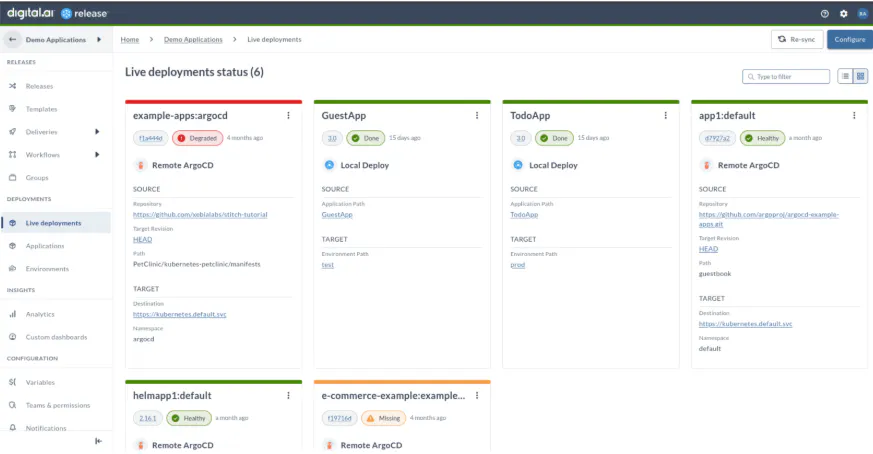
A look at the dashboard used to assess live deployments across multiple projects.

Plugin & Integration Pack

Evidence is commonly scattered across tools; secrets management and quality checks are manual; and CI/CD engines report status in different shapes, forcing teams to write custom code. Release 25.3 expands what you can automate inside the pipeline, bringing evidence and actions into one place, with the following integration updates:

  • Tekton (Container Plugin): trigger and track pipelines in Kubernetes and drive Release flow based on run outcomes.

  • AWS Secrets Manager (AWS Container Plugin): create, fetch, update, and delete secrets.

  • Dynatrace: create synthetic monitors, run them on demand, and gate promotions on results.

  • Confluence: add watchers, labels, and restrictions to keep stakeholders informed.

  • Octopus Deploy: create releases against a pinned Git ref for config-as-code projects.

  • ServiceNow: create/update CMDB CIs and records and enrich change requests with affected CIs.

User Interface Highlights

Improved user experiences allow for greater efficiency and simplicity. Navigation is faster, investigations are simpler, and guards like timeouts and risk signals are easy to review.

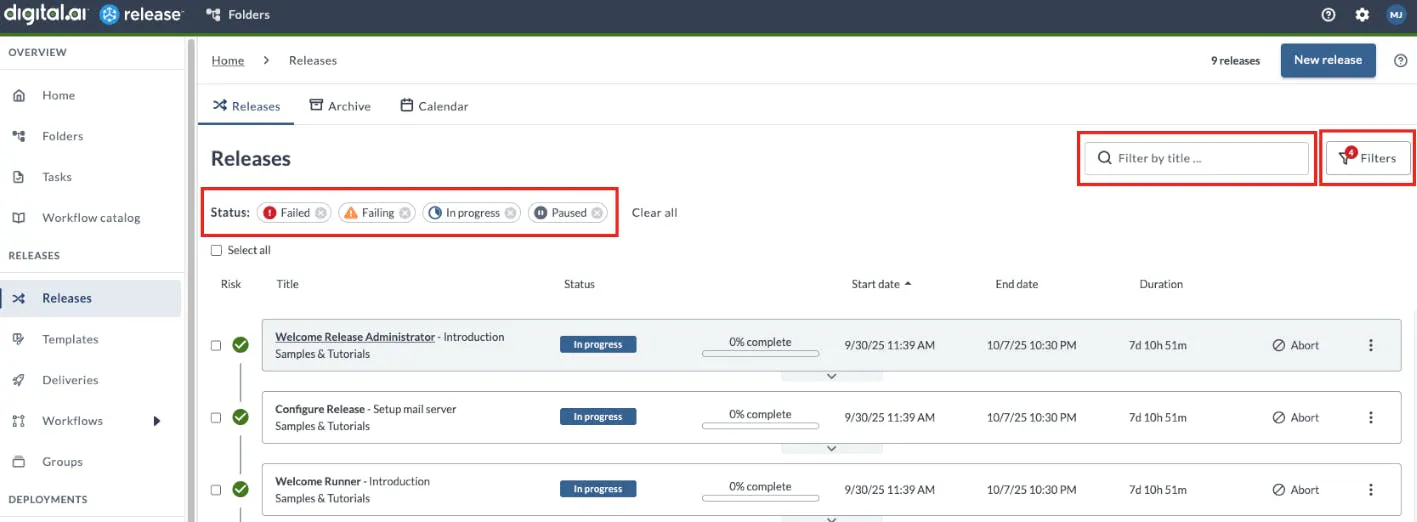
  • Release list & calendar: more sorting options, lists of applied filters (title, owner, tags ALL/ANY, status, risk), and folder-level calendar views.

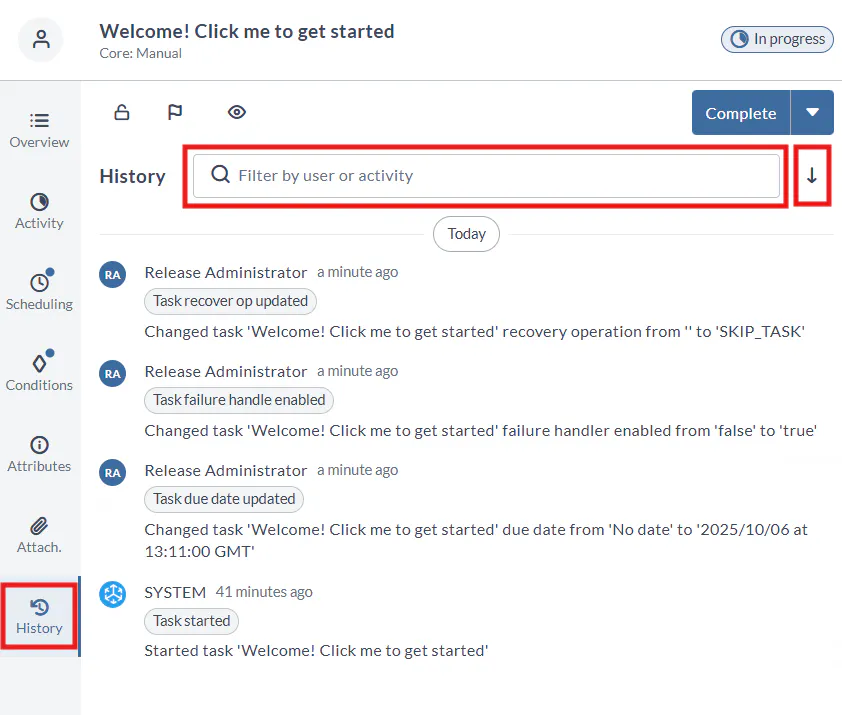
  • Task Drawer history: filter by user/type, sort by time, investigate without leaving the task.

  • Phases: color picker (HEX/RGB) and adaptive widths for deep nesting; clearer readability for complex plans.

  • Risk & timeouts: enable/disable risk calculation in the UI; set timeouts for scripts, preconditions, and failure handlers.

  • Runner Registry base URL: robust sub-path support and URL validation for private registries.

The Task Drawer now includes a “History” tab, providing a comprehensive view of the activity log for that task.

Releases can now be filtered by title, and the remaining filters have been reorganized for easier use.

Conclusion

A shared AI control plane (MCP), updated workflows, and expanded integrations reduce tool sprawl, improve visibility, and help teams meet business goals with confidence. By consolidating decision logic and automating the proof behind every change, you ship faster with fewer incidents, lower operational cost, and audit-ready records.

Review our release notes to discover how Digital.ai Release 25.3 can transform your software delivery process by providing AI-enabled orchestration, improved security and versioning, and improved integrations.

2
G

💡Tips for Deploy ➡️ Recommended copy strategy for file.Folder deployments

For file.Folder deployments use archive-based copy strategies.

Tar is the preferred default on Unix/Linux because it preserves permissions and, starting from version 25.3, extracts directly into the target folder for faster execution.
Additionally, TAR - file.Folder deployments now support finer archive extraction control with stripComponents and members options.

Zip copy strategy is designed for .zip artifacts and is ideal when deploying to Windows hosts, but also .zip artifacts when deploying to Unix/Linux targets over SSH, especially if you need to preserve file permissions.

Enabling Autodetect is recommended. It selects the appropriate extraction tool based on the artifact’s extension (TAR, ZIP, etc.), optimizing deployments with no host-level configuration required.

Learn more about the file.Folder copy strategies and performance improvements.

4
G